
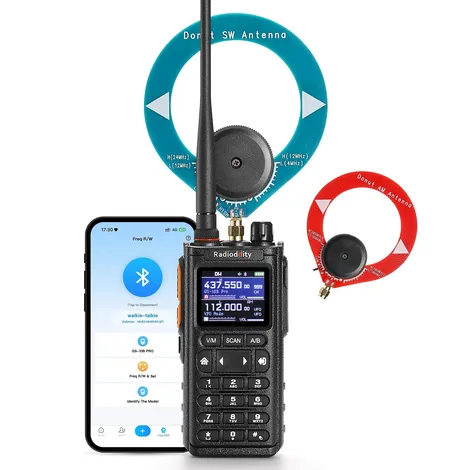
The Radioddity GS-10B Pro crams an impressive amount of capability into a handheld transceiver of a typical size.
As a dual-band FM amateur radio transceiver, the GS-10B Pro performed admirably. With its 8.5-inch-long, flexible, VHF/UHF antenna, it received all my local repeaters as well as any other handheld radio in my collection. My transmitted audio was clear. Radioddity advertises that the radio transmits at power levels of two, five and eight watts, but I lacked the equipment to measure its output. Unlike its younger brother, the GS-10B, the GS-10B Pro’s specifications do not indicate receive or transmit capability on the 1.25-meter (220 MHz) band.
Key flexibility
The radio has three keys on its left edge. The top key is dedicated to push-to-talk (PTT) and the bottom two (labeled PF2 and PF3) are user-configurable. One possible configuration is to assign PF2 to be the PTT key for the “B” (bottom) channel on the display. In this configuration, the main PTT key operates only the A (top) channel. If the user does not choose to make PF2 a PTT key, the main PTT key operates either the A or B channel, depending on which channel is selected with the A/B key on the front of the radio.
Informative display
I appreciated that the radio’s 1.77-inch color screen displays both the channel name assigned by a programming app and the RF frequency.
Battery
The GS-10B Pro arrived with a 2,500 milliamp-hour lithium-ion battery. The battery has no contacts for a drop-in charger. A USB-C cable is the only way to charge it. Radioddity packages such a cable and a “wall wart” AC adapter with the radio. I left the radio on and scanning and it ran for more than 34 hours before announcing a low battery voltage. Many operators prefer to have at least one spare battery for their handheld radios, but I was unable to find the battery available for sale on the Radioddity website or elsewhere. The radio’s belt clip attaches to its battery, not to the radio’s case. If a user was able to purchase a spare battery, they’d want a spare belt clip for the spare battery.
Case and belt clip
I found the radio comfortable to hold and to carry, but the belt clip is not as secure as I prefer. On my belt, the bottom of the clip did not clamp tightly against the radio, making it easy for the radio to slide up and off my belt. For this reason, I’d be reluctant to make this radio my daily carry.
PC programming
The version of the open-source programming app CHIRP that was available when I wrote this review (CHIRP Next 20260904) supported the GS-10B but not this radio, the GS-10B Pro. Radioddity provides, however, Windows customer programming software (CPS) as a free download from its website. Version 1.03 of this CPS functioned adequately but lacked some valuable features. The CPS read from and wrote to the radio easily with a standard Prolific programming cable (not included with the radio). Typing channel information into the CPS was straightforward.
The CPS easily and correctly imported data from a comma-separated values (CSV) file created by CHIRP, which saved me a lot of time. I simply used CHIRP to export data from a file that I created for a UV-5R and then imported that file to the GS-10B Pro CPS.
The Radioddity CPS lacks the ability to insert channels in the table or move channels up and down the list. Users must add all new channels at the bottom of the list. The only way to change the order of channels is to export the list to a CSV file, edit that file with a another program and then import the edited file to the CPS.
The only way I found to delete a row (channel) with the CPS was to delete the frequency in the “RxFreq” cell.
Bluetooth programming
The GS-10B Pro has a built-in Bluetooth radio that makes it possible to program the GS-10B Pro with free iOS or Android “walkie-talkie tool” apps that are available on each operating system’s app store. I tested the Android app on my Samsung mobile phone.
After I enabled Bluetooth on the radio’s menu, I had no trouble linking the app to the radio. The greatest challenge the first time I used the app was finding the button to read data from the radio. Both the on-screen Read and Write buttons are partially covered by the Android navigation bar (see screen shot below).
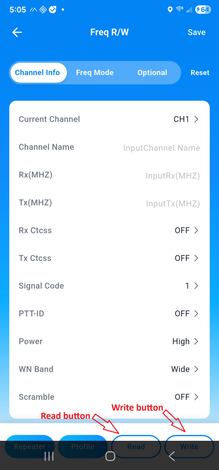
Adding and editing channels with the app was a straightforward process. Clearing the contents of a channel was less so. The app provides no single button to delete the content in every field of a channel, but I could empty each field the selecting it and backspacing over the field contents.
The app has no “next” or “back” button to switch from one channel screen to another. Switching from one channel screen to the next requires three touches. A touch of the channel number brought up a scrollable list of 998 channel numbers with no data to indicate which channels already had frequencies or channel names assigned. Touching any channel number in that list selects it, a selection the user must then confirm by touching a “Confirm” link. The app then displays a screen for the selected channel. Because the app displays only the channel numbers in the list, users must remember the number of the channel that they need to edit next. A more user-friendly interface would provide “next” and “back” buttons on each channel screen and a channel list screen that includes at least a channel name (if programmed) with each channel number, but the Radioddity app provides neither.
One key frequency copy
A third way to program channels in the GS-10B Pro is with its “One Key Frequency Copy” function. When activated, the radio detects the transmitting frequency and tone squelch code of a nearby transmitting radio. Once received, the user may store the data in an empty channel. This feature is useful only for simplex channels, because if the transmitting radio is configured with a receive frequency that’s different than its transmit frequency (as in a repeater configuration), the GS-10B Pro has no way to know what the other radio’s receive frequency is. Once a frequency is stored, users cannot edit channel frequencies from the keypad. This can be done only with the mobile or PC app.
Very wide receiving capabilities
A unique capability of the GS-10B Pro is its ability to receive signals in a wide range of frequency bands and modes, including the low frequency (LF), high frequency (HF), FM broadcast and VHF aircraft bands and AM, SSB and CW on the long wave through short wave bands.
AM aircraft
I was able to enter AM aircraft frequencies into the radio’s memory channels, just like my FM amateur frequencies. With the radio connected to the supplied dual-band antenna, I heard aircraft clearly inside my home when they were near enough. I’m too far from the nearest control tower to hear air traffic controllers.
Magnetic loop antennas
The GS-10B Pro has two SMA antenna connectors on the top of the radio. The flexible UHF and VHF antenna connects to a male SMA connector on the radio. A female SMA connector, also on the top of the radio and normally covered by a threaded cap, is for the LF and HF bands. Radioddity supplies two magnetic loop antennas etched in round printed circuit boards that are 10 cm (3.9 inches) in diameter. The company calls them “donut antennas.” One donut antenna is for LF and the AM broadcast band (500 KHz to 2,000 KHz) and the other is for HF (4 MHz to 24 MHz). A male SMA connector is soldered onto each printed circuit board.
Connecting one of the magnetic loop antennas essentially converts the GS-10B Pro to a tabletop LF/HF receiver.
Surprising LF/HF reception
When hams use magnetic loop antennas to transmit on HF bands, the loops are typically 30 inches in diameter or larger, so I didn’t expect much from a 4-inch loop.
To test the performance of the radio’s HF receiver and included magnetic loop antenna, I first tried them on the desk of my shack well after sunset. I clearly copied an amateur station on 40-meter lower sideband (LSB) that was 157 miles away. I then took the radio and HF donut antenna outdoors. There, I clearly copied three HF AM broadcast stations between 7300 KHz and 7600 KHz; one whose transmitter was in Nashville, Tennessee (350 miles away) and two that transmitted from Greenville, North Carolina (564 miles away). Before I went back indoors, I copied another amateur station on 40-meter LSB; a Parks on the Air station 148 miles away.
Back indoors, I used an SMA-to-UHF adapter to connect the GS-10B Pro to the dipole antenna that I normally use with my HF transceiver. A station broadcasting from France on 9490 KHz AM came booming in.
Another night, near midnight, I connected the AM broadcast donut antenna to the radio. From inside my shack, I clearly copied stations 108 miles and 157 miles away.
I suspected that even a small wire antenna would out-perform the small magnetic loops, so I rigged up a way to connect 10 feet of wire to the center conductor of the SMA connector. Right around dusk, I took the radio outdoor and threw the end of the wire over the string of lights that hangs about seven feet over our patio. With that set up, I clearly copied amateur stations:
- 108, 262 and 720 miles away on 40-meter CW
- 720 miles away on 40-meter CW
- 572, 633 and 852 miles away on 20-meter upper sideband
- 890 miles away on 20-meter CW
The GS-10B Pro tunes these frequencies in steps no smaller than 1 KHz, so I often found it necessary to use the radio’s “BFO” setting as a fine tuner for both single sideband and CW signals.
Conclusion
As a handheld, VHF/UHF FM transceiver, the Radioddity GS-10B Pro offers typical performance. Its performance as an untraditional LF/HF receiver is better than expected, especially when connected to a random-length wire. The radio is no substitute for a purpose-built HF receiver but could be fun to use on a camping trip when space for gear is limited.
Disclaimer: Radioddity provided a GS-10B Pro for this review but had no control over the review’s contents.