
When the National Weather Service (NWS) started its Skywarn program in the 1960s, the first participants were licensed amateur (ham) radio operators. While many ham radio operators remain active in the program, the Skywarn storm spotters of today have many ways other than ham radio to send their reports. This article covers some of those communication channels for the benefit of spotters who don’t have ham radio licenses and for hams who need to send reports when their local on-air Skywarn networks are not active.
Phone calls
When a Weather Bureau meteorologist started the first ham radio Skywarn network after the Palm Sunday tornadoes of 1965, few people had car phones. Now, approximately 97% of the US population carries or owns a cell phone of some kind, according to data from the Pew Research Center. To report a tornado, funnel cloud, wind damage, etc. directly to an NWS weather forecast office (WFO), a trained storm spotter need only dial that office. Most WFOs have set aside a phone line for the sole purpose of receiving spotter reports.
A phone call gets attention in the WFO faster than most other reporting methods, so dialing the WFO is probably the best choice for the most dangerous sightings, like funnel clouds and tornadoes.
To keep people from using spotter phone numbers for other purposes, WFOs do not usually make them available on the web or other public communications. They usually provide special phone numbers during local storm spotter training classes. If you’ve taken the spotter course and misplaced the number, contact your local WFO now (via a number on the WFO’s website), tell them when you took the Skywarn training, ask for the number, and store it in your phone.
Alternatively, if you are a member of Spotter Network (see below), that organization’s “Submit Report” web page usually provides the spotter phone number for the appropriate WFO, based on your location.
NWS web forms
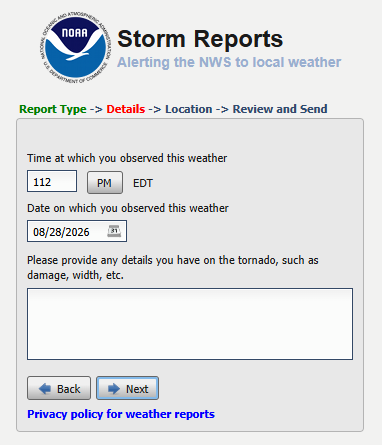
Any spotter who has access to the web (including via a mobile phone) may enter a report on a web form for any WFO. The URL is the same, no matter where you are: https://inws.ncep.noaa.gov/report/.
Spotter Network
Spotter Network, Inc. is a non-profit organization that is dedicated to bringing storm spotters, storm chasers, coordinators and public servants together in a seamless network of information. Storm spotters who join the organization and complete its online training may submit their reports via a form on the Spotter Network website. When the website determines the spotter’s location, it displays the location and phone number of the appropriate NWS office. That gives the member the option of calling the WFO for more urgent reports or completing the form. Spotter Network forwards data from its web form directly to the NWS.
X.com (Twitter)
Most WFOs have accounts on the social network formerly known as Twitter. Tagging your local WFO in a tweet is a great way to send a photo to supplement your report. It’s important to remember, however, that a tweet might not get noticed immediately, so a phone call is better for something like a funnel cloud or tornado. To find the correct X.com username to tag, search X.com for “NWS (office name).” For example, a search for “NWS Northern Indiana” reveals that the tag you should include in a tweet for that office is “@NWSIWX.” Don’t assume, however, that all WFOs use their three-letter IDs in their X account names. The Indianapolis office, for example, uses “@NWSIndianapolis,” not “@NWSIND.”
Facebook is another way to send photos of severe weather or its impacts. Some NWS meteorologists have told me, however, that during severe weather, their offices don’t always have time to check Facebook often, making it a poor way to report a tornado. Facebook is well-suited, however, for sending photos of storm damage after a storm passes. Such photos can help WFOs decide where to send survey teams the next day. Search Facebook for the page that your local WFO operates. When you get there, post your report as a comment under an existing post on the page.
mPING
Meteorological Phenomena Identification Near the Ground (mPING) is a project to collect weather information from the public through their smart phones or other mobile devices. The free mPING iOS and Android mobile apps were developed through a partnership between the National Severe Storms Laboratory, The University of Oklahoma and the Cooperative Institute for Mesoscale Meteorological Studies. Anyone may download the apps from the Apple App Store or Google Play. Among the weather phenomena that mPING users may report are tornadoes, hail, storm damage and winter weather impacts. The reports use the mobile device’s GPS unit to include the exact location in the report and to route the report to the appropriate WFO. Some other apps, like RadarScope incorporate mPING so users can send reports without changing apps.
Every WFO has a general email address. Meteorologists eventually see messages sent to those addresses. It’s unlikely, however, that such an email message will receive immediate attention, especially during severe weather. This makes email better for after-the-fact damage reports than for tornado reports. To find a WFO’s general email address, scroll to the bottom of the WFO’s web page (e.g. www.weather.gov/ind) and click on the link that reads, “Comments? Questions? Please Contact Us.”